Chapter Five
Community Investment#
When starting any task, it’s instructive to look at the finished product as a reference. We see plenty of examples on GitHub of mature projects that seem unabashedly complex. The intricacy of their release process, the thoroughness of their test suite, the size of their engaged community, the depth of their documentation—it all adds up to a mountain of completeness you couldn’t possibly emulate in your own open source work. Maintaining an open source project can feel a lot like drawing an owl. (FIG 5.1) 200
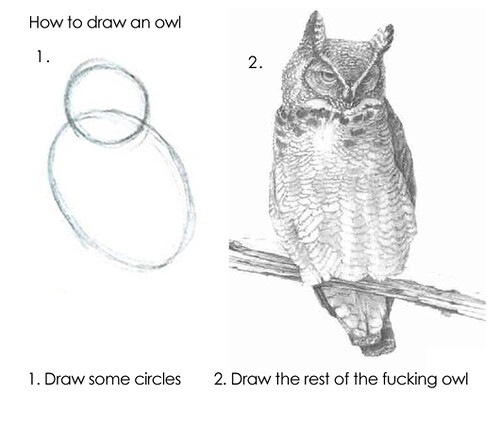
FIG 5.1: Open source work can feel like this. “How to draw an owl: Lessons in becoming an expert in a couple of easy steps” by Cea. is licensed under CC BY 2.0.
How so? These examples are intimidating and hard to imagine as the result of steadfast improvement. It’s important to highlight that none of these projects started this way. They started as ill-defined, incomplete circles, not owls. Hundreds of intermediate steps combined to build what you see today. Dan Mall reminds us of this within any creative process when he tells us that “it’s easier to revise than create.”201 The project was improved day by day, commit by commit, contribution by contribution.
You simply cannot do it all at once. That’s why last chapter focused narrowly on fundamental concepts that serve your project well in its most immature or selfish state: useful to you, future you, and what I’d call motivated masochists, or maybe nicer labeled early adopters. A README, LICENSE, CHANGELOG, and CODE_OF_CONDUCT are the least you can do to document, protect, and communicate the seedling of your project.
Some projects may not meet or eclipse this moment, and that is fine. But some grow into more. Sustained work attracts more people, each with different needs, priorities, and constraints competing for attention. If you aren’t careful in your designed engagement, the very network you’ve worked to build can work against you. Let’s outline a few areas to invest in.
Documentation#
The more software you write, the more you realize that code is only part of the journey. As the surface area, nuance, or use cases of a project grow you naturally need to document it. Do I need to document the release process? (The answer is always yes, by the way.) The corners you cut, the fundamentals you neglect, become untenable omissions when sharing the project more widely. When we leave town for a few days, my son leaves a note for my mother so she knows how to care for the pets. Even down to the lighting care for the fish tank. Without this, she’d be left to guess. Think of documentation as a first-class artifact of the product—on as equal footing as the code itself.
But it’s not enough to merely prioritize documentation equal to the code. The most thorough docs in the world won’t help your users find what they are looking for if they aren’t well-structured or approachable. What if you want to use your docs to show more than tell, or reach broader audiences?
Isolated Examples#
An exhaustive accounting of API methods and options has its place. A time will come when you need to see the exact response object schema from an endpoint, or the layout of parameters in a function. But you can diversify the method of learning this content with a little extra effort. For example, the MDN documentation for the CSS property justify-content (FIG 5.2)202 not only defines the syntax and links to the specification and browser support tables, but front and center is an interactive playground feature.
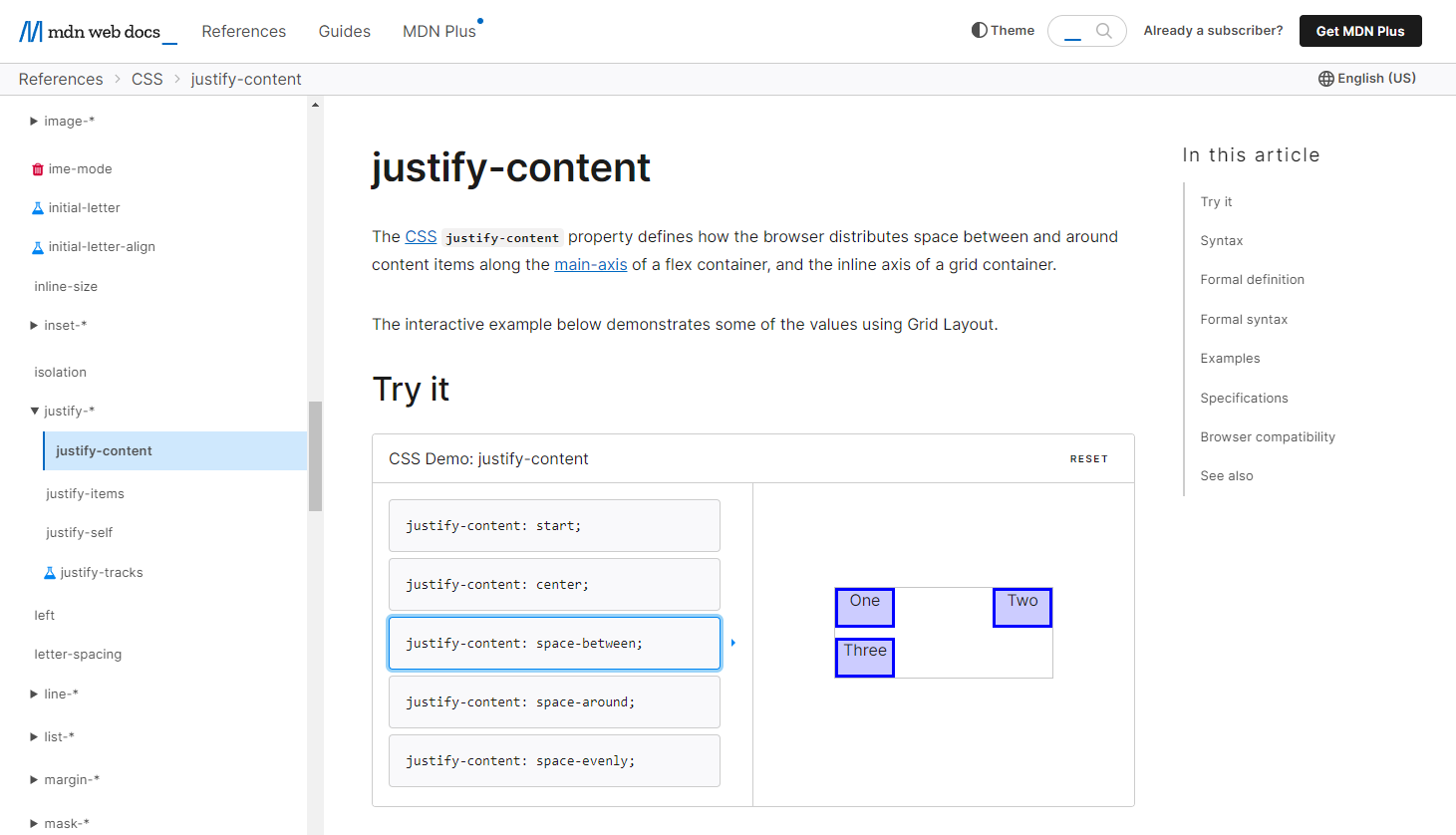
FIG 5.2: The justify-content CSS property on MDN with a demo among the first content.
The documentation itself demonstrates different property values, from centering content to spacing them evenly, etc. This visual is just what someone might need to jog their memory or grasp a concept when they are in the midst of another task. And if they need to dive deeper, they are free to explore further.
Chris Coyier’s oft-bookmarked CSS-Tricks article “A Complete Guide to Flexbox”203 includes an embedded editor of the online CodePen tool,204 letting visitors fiddle with HTML and CSS and see real-time layout changes. Open source projects might write their own sandbox or REPL (Read, Eval, Print, Loop) tool, like Babel’s, showing how different configuration alters your transpiled JavaScript input. (FIG 5.3)
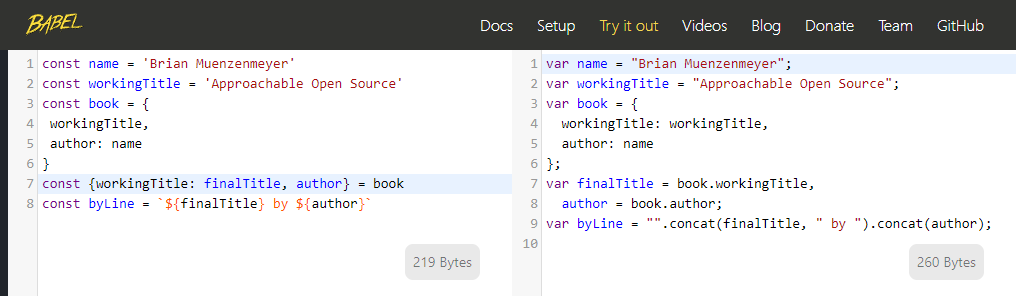
FIG 5.3: The Babel REPL allowing users to try the software online. Input on the left is sent through the library and output on the right. Explore options, all without installing the tool.
A tool like this available without the need to install it yourself has immense impact on the approachability of the project. Users can learn about your project without having to invest their own time, filesystem, or infrastructure to do so. It might serve as an excellent end-to-end test as well, keeping your input and output aligned to expectations in their purest form. I note, in my typical cautionary way, that these features incur maintenance and stability risks. They become products themselves, far beyond a README.
Search#
It’s hard to deny the simple utility of cmd or ctrl + f to look for something within a document. Some open source projects really lean into this concept, like lodash205 making massive single-page files defining their entire API. The static site generator Eleventy adopts a similar low-key but effective search strategy,206 passing search terms to an external search provider subset to their own website. The result is a target query like date formatting site:www.11ty.dev which search engines are great at indexing and filtering.
But when your information architecture places content across files or pages, and you want a more integrated experience, built-in search adds increasing value. Many open source projects apply for free search capabilities from the easy-to-integrate Algolia provider. (FIG 5.4)207
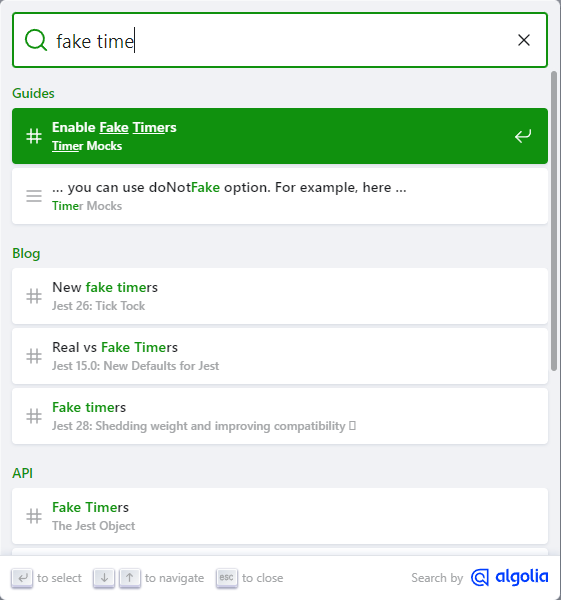
FIG 5.4: Search results powered by Algolia, of the jest testing framework. Be careful what you index, however. Most people probably don’t want a blog post from 2016 before the actual current API info.
There will be pressure as you start to accrue API documentation, guides, tutorials, blog posts, meta files, and everything else. Search can act as a safety valve. A well-designed information architecture is possible with time and effort, but search can circumvent or mitigate sprawl. A well-crafted search experience can reach across all semantic boundaries of content to help a user find what they are looking for. You’ll find that some users prefer each method of content discovery. Again, this extra effort represents more time spent away from your real product, but can pay dividends to you and your adopters.
Internationalization#
A steady refrain here has been that as your project grows, you’ll attract more and more users from diverse backgrounds. English should not be the assumed, singular, mode of communication on the World Wide Web. While around sixty percent of all web content is in English,208 Hootsuite reported that thirty-two percent of Internet users translated text on a website within a single week.209 In the technology and open source sector, content is skewed toward English,210 even as the global community of engineers and open source participants grows. It’s hard to conclude an appetite for multilingual content is non-existent.
Still, many systems require English, such as the Common Vulnerabilities and Exposures (CVE) spec.211 And some folks even suggest English-only or English-default technical content is more precise and accessible than fragmented and poorly translated variants.212 That link points to a blog post where the author self-describes this position as an “ugly American” viewpoint. This complex tug-of-war isn’t limited to open source or tech. The Dutch government is proposing a limit on English-language university curricula popular with foreign students.213 This highlights the continual balance sought between intellectual openness, talent competition, and national economic pressures.
Me? I’m privileged enough to have English as my first language. I’ve lived and worked within a system that benefits me across many dimensions, including language. I haven’t felt the sting of having to search for an error message that looks doubly unfamiliar to me. I respect the notion that if thirty-three other language communities work to translate the semver docs,214 there is content there of value.
While it might feel presumptuous to plan for translation—it doesn’t hurt to at least consider this eventuality when you feel your project is on the cusp of broader relevance. Users interested in translated content will approach you, and an early decision may make translation easier. Factor in your internationalization posture as a dimension in the README vs. website decision. Adding internationalization to a custom website could mean a complete rewrite, versus choosing something that has internationalization routing built in.
When to Break the Rules#
If you ever catch yourself or your team stating that you will write the documentation later, stop and reflect on if that’s the right prioritization. Very rarely is this an intelligent deferment. Like doing the dishes, it gets harder and harder to catch up the longer you postpone. When your solution is still in extremely rapid API development or shifting approach, you have cause to wait. Likewise, there are things you may want to document, but perhaps not make broadly available to the public. Onboarding guidance for mentors, community moderation proceedings, and security vulnerabilities may warrant discretion. Private documentation is still better than no documentation.
Projects that Stand the Test of Time#
The Bjarkemål is an Old Norse poem I studied in college. 215 It tells the tale of Rolf Krake and his retainers as they awake to battle a numerically superior foe. Stories, songs, and poems were essential oral tradition, but many are lost to time, including most of the Bjarkemål. The legacy of this poem, however, is what really excited me, even as the source material no longer exists.
-
There are accounts of this poem being sung by bards contemporaneously, used to amp up the troops of another battle some 30 years later.
-
There is a revisionist push to tie the poem to a newly-sainted king dying in battle. Or was he embarrassingly ambushed, even murdered by his own men?
-
A Latin translation exists from the author Saxo Grammaticus 200 years later, but it’s widely believed to contain large embellishments, additions, and plagiarized themes from the Aeneid.
What a curious mess! It’s both heartbreaking and fascinating that so much speculation and creative license can stem from one undocumented, oral story. How much more do we get wrong, or lose in translation?
In contrast to the Bjarkemål, the world has the Tripitaka Koreana woodblocks housed within the Temple of Haeinsa in South Korea.216 (FIG 5.5) These 81,258 wood carvings date back to the time of Saxo, and have been perfectly preserved using techniques invented and mastered there. Within each block are hand-carved characters representing Buddhist scripture. In all, they store fifty-two million characters of data, meticulously preserved for eight centuries. The world may not have ever seen a more thorough, accurate, and lasting documentation effort.

FIG 5.5: Tripitaka Koreana woodblocks meticulously preserved for eight hundred years. Photo from The Library: A World History by James Campbell and photographer Will Pryce
These two works, the latter a success and the former quite lossy, align nicely with GitHub’s goals within the Arctic Code Vault program217 to preserve open source information for the next one thousand years. In 2020, GitHub placed twenty-one terabytes of repository data within an adapted mine at Svalbard, a Norwegian island archipelago near the North Pole. The site is geologically stable, naturally temperature controlled, and located a mile from the Global Seed Vault.218 Let’s hope our READMEs are read by our future maintainers.
Here and now, our open source projects exist on a much shorter timescale. Even the venerable Express web server project isn’t old enough to drive yet. Git is almost old enough to vote in the United States. curl has a car payment, and maybe a mortgage if it’s lucky. These projects persist on the resilience of their communities. The Node.js team celebrated ten years of the project by holding planning sessions to steer the project into the next ten years. Their open governance almost guarantees success. Implementing our fundamentals within a project preserves the intent necessary to understand the work. Recording the instructions defines the steps required to execute software. Once released, most software never really dies. It lingers on CDNs, package registries, in dormant code repositories, a half-life we’ve barely begun to understand or measure at scale.
We are privileged to be inventing our digital norms right now, a continuous chain of decisions dating back a single lifetime. A symmathesy! As long as software holds true to the mantra of “don’t break the Web,” we will be able to look back to yesterday. The general availability of software under the semver model of versioning allows us to march forward with confidence while preserving the past. It’s delightful to pick up an old project and see it run, even over ten years later. I recently hosted my first jQuery plugin, CompassRose,219 as a sort of time capsule. The code arranges and manipulates DOM elements along a unit circle. (FIG 5.6) It’s more toy than tech at this point, but its ease of use even now is a testament to the availability of software long past its shelf-life’s expiry.

FIG 5.6: The still-working demo site for my first jQuery plugin, circa 2012.
When working within the Node.js ecosystem, include a lockfile, the package manager used, and the required Node.js version. This provides hints to current and future users how to pick up the project. For Chapter 3, I locally cloned and ran the graph software necessary to generate the dependency comparisons of Next.js and Create React App. It had a three year old package-lock.json lockfile, which resolves and helps install 546 separate packages, and “just works.” Ten or three years of entropy without incident isn’t eight hundred, but I’ll take it.
Community As Product#
The atmosphere we create around our open source product is an important determinant of its progress and longevity. This community can be intentionally designed—it’s not enough to put something out into the world and expect overnight success. It will take sustained effort. Starting something is a lot easier than maintaining it, observed within the Linux Foundation census.220 Maintainers often leave the projects they begin. Whether the project lives or dies is a litmus test. How self-sustaining has the community become? More contributors create inertia that keep a project moving. With proper planning, governance, and safety, contributors plot a course, direct traffic, clear a path, push in unison, and help one another rather than play tug of war or fret over direction. To create projects to stand the test of time, you need to design a space that is welcoming to all. You need to invest development time into creating features that create connection. You need to communicate transparently in every aspect of the project.
And lastly, you need to listen. Open source, at its best, is about creating something larger than yourself. That only happens when you let others in. We can interact with one another as both user and maintainer like an episode of the Great British Bake Off, not Master Chef. The relationship can be supportive and respectful, not adversarial or competitive.
Creating Avenues for Feedback and Communication#
Feedback is like dust. It’s all over, the result of every action, but only visible if we pause to look at what’s settled or observe that rare sunbeam of clarity. Often you’ll notice feedback when things go wrong. The Harvard Business Review found that the most effective teams exhibited a ratio of over five compliments for every criticism,221 a ratio unlikely to be found on even the most successful open source projects. This can be frustrating—you get used to it—but if you are persistent, lucky, and exercise empathy it never quite stops pushing you to improve.
Feedback is a moment of engagement, a real-time value exchange where user and maintainer can level with one another. User to user connections leapfrog you as maintainer to accelerate learning and coalesce effort around the known boundaries of your program. You might find out that an inadequate setting or shortcoming on your project has sprung up a cottage industry of workarounds. Don’t be offended—do your best to enter into these exchanges with an open mind, civility, and preparedness of action.
Consider ways to connect users of your software. Whether you like it or not, you need not even be a party to the conversation. Crowd-sourced help and troubleshooting offer more ways for your users to connect, leading to a novel approach or resolution of a problem, collaboration, and collective contribution. It humanizes the value exchange farther than a README ever could, and if individuals want to, can open up doors. Fostering communication and networking beyond you as the hub expands the engagement of others toward shared ownership.
Sites like Reddit allow for subcommunities to congregate around specific topics. Perhaps your project is large enough to warrant one, like the Inkscape222 or Eleventy223 communities. Question and answer site StackOverflow lets anyone create topic-tags224 to focus, filter, and follow conversations. (FIG 5.7) Users can even subscribe to an RSS feed.
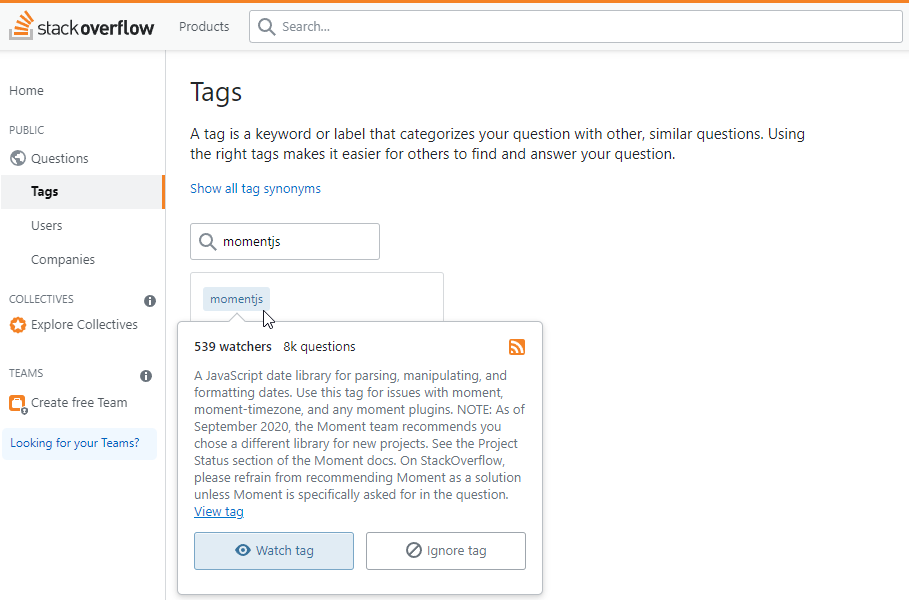
FIG 5.7: Stack Overflow tag for Moment.js library. 539 people are watching for new questions for this library.
Beyond an issue log are many chat programs that look to introduce real-time communication into a project. Discord, Slack, Gitter, and IRC all have features that allow users to message with one another. They offer special-interest channels, direct messaging, and creature-comforts like bots, emoji, and personalization. Often they have mobile clients that make access a swipe away. Good for idle-time triage, and again ripe for too much intrusion—you decide! Your project’s chat footprint becomes another area where the code of conduct applies. Ensure this new avenue of engagement remains a safe place for all. Set clear expectations, and look for responsible members to help moderate these spaces. Also be careful not to slide into a state where the only communication occurs through these channels—you still want your project to be accessible to those that don’t use chat.
If you want something with better longevity and discovery than a chat firehose, turning to tried and true online methods like an email or forum are hard to beat. Mailing lists have a surprising degree of activity within older projects. Bulletin board software still exists out there too—even if you haven’t visited one since the likes of phpBB dominated the web’s early Q&A communities. Check out some options in the Resources section. Open source projects can often apply for a free access tier to tools like these. The Vivaldi browser project operates a forum225 complete with large topic areas and sixteen language-specific areas to meet their users across the globe. This can be a really nice extension for your project if you expect to interact with non-developer users. The need for an account to interact beyond browsing code repositories might be off-putting or confusing to your audience.
For developer-centric communication, GitHub has a discussions feature that integrates into repositories or organizations.226 It’s convenient as a maintainer to have a single UI to go to for all things related to your project. The tight-coupling of a discussion to other aspects of your codebase is helpful, too. If someone opens an issue that is vague, general, or looking for guidance, convert the issue into a discussion. This focuses coding-related efforts within the issue log and community and user-facing help within discussions. Each can have their own participants, focus areas, and engagement patterns. A discussion forum like this is a nice entry point for users looking to contribute more to the project too, lending their expertise to others.
Seek out users where they are and you’ll lower the barrier to engage. It’s an investment—one that can create new pathways for the project. Make sure you do this on your own terms.
Network Overload#
My father once told me a story about priorities, in which his boss had asked him to do one too many things at a time. They sat down to talk about it. My dad presented a sticky note for each task deemed a high priority to get done. He slowly laid them all out on the desk. It was probably a bit tactless, but he’s sorta that way. With limited staff and resources, there was obviously too much. If everything is a high priority, nothing is. By the eighth or ninth note, his boss relented. All those other priorities were more important than this new one. He was “managing up” his boss on kanban or agile principles outside the realm of software development.
With a project of increasing size, you may find yourself with a chat presence on Gitter, Slack, Discord, or whatever the future brings. Folks might start chattering on social media and across your inboxes. Notifications can quickly run rampant. The coding platforms we use today generate notifications for nearly every activity on a subscribed repository. I once took a week out of the office and returned to over two-thousand notifications. (FIG 5.8)

FIG 5.8: My notification inbox showing 2007 items to review. I haven’t tuned what I am subscribed too well enough.
When many users, automations, and robots converge in your inbox, it can be easy for the important stuff to slip by amidst the volume of distractions. While employing no ill intent, well-meaning actors can inundate maintainers.
Tools that give you control over scope, interval, medium, and intrusiveness help reduce noise. One of the simplest things you can do to reclaim agency over your project is to configure notification settings. Expose yourself to updates under terms that are sustainable and healthy to you. I recommend:
-
turning off default, global email notifications
-
using the web app or native app intentionally, with as few push notifications as possible
-
selectively subscribing to repository actions with high impact (like pull requests or direct mentions)
-
filtering notifications of dependent projects to releases only
-
using a weekly digest for low-priority notifications, such as Dependabot alerts227
-
leveraging email headers and CC fields to further filter on urgency228
Once you develop a healthy notification protocol, you won’t feel as on-edge about any one update. The important stuff rises to the top—the rest can wait. You still need to eat, spend time with loved ones, sleep, and commit to self-care. The “speed of open source” works in your favor too.
Meritocracy…?#
The last leg of our journey into community as product is a discussion about meritocracy. It’s the albatross of open source thinking and needs to be actively dismantled. I reject the notion that meritocracy—governance based on ability alone—holds any redeeming value in successful, long-lived projects. It’s an enticing fairy tale to spin that good ideas can come from anywhere, or that measuring worth based solely on project contribution is a virtue worth codifying.
But enshrining meritocracy above all else fails to look critically at the inequities inherit in open source software, as well as the entire tech industry. White, male, cisgendered viewpoints are the default viewpoint, and carry with them more self-perpetuating weight than other perspectives. What does this even mean, from the Apache Software Foundation229:
When the group felt that a person had “earned” the merit to be part of the development community
What context do words like “felt,” “merit,” and “earned” have here? It sounds awfully subjective, their definitions malleable enough to introduce bias and abuse. The Apache Software Foundation does great work, but this isn’t among it. You, yes you, don’t need permission to exist or someone to tell you that you belong. The Open Source Way guidebook,230 an expansive and thoughtful project itself, devotes a section to inclusion and meritocracy worth looking at231:
At first glance, open source seems immune to the multi-pronged problems with diversity and inclusion plaguing technology companies. Open source ecosystems operate online; contributors work across countries, languages, and timezones to power projects that drive technology forward. In some cases, people contribute purely out of love for these projects, not for free beer and stock. Given the prevalence of such altruistic intent, the thinking goes, open source is a true meritocracy, a space where all can thrive regardless of their pronouns or the color of their skin. But if there’s one thing that industry advocates love more than meritocracy, it’s data. And when the data shows who contributes to the open source ecosystem, it paints a damning picture.
To make projects inclusive, you need to “stop saying you’re a meritocracy.”232 You need to create asynchronous opportunities to contribute. You need to exercise grace in shepherding less-than-ideal efforts. You need to stop forcing people to decide between dinner with the family and the late hackathon and happy hour. Intertwining alcohol into your event will push people away looking to avoid risky situations.
Oh, and that damning data? It isn’t going away. GitHub’s 2017 Open Source Survey233 reported that a staggering ninety-five percent of respondents were men. Four years later, the State of JavaScript and State of CSS surveys reported sixty percent and seventy percent male respondents, with large numbers deciding not to divulge. Their solicitation and results cause quite the commotion on social media each year, with an understandable backlash and respondent boycott.234 Does one trust, or want to trust, the results of such a one-sided population? Is this self-fulfilling prophecy? Survey organizers invest a lot of time into these efforts, and yet the results skew male.
The 2021 Diversity, Equity, and Inclusion in Open Source report by the Linux Foundation235 states that just fourteen percent of participants in open source technology are women. Women, as traditional primary caregivers, have less time to work on open source compared to other duties. Further, Black, Latinx, and Indigenous peoples are “far more likely than White/ Caucasian people to experience exclusionary behaviors in open source communities.” One anonymous survey respondent puts it succinctly:
The meritocracy model typically assumes that people have a ton of time to invest to prove their ‘worth’. People who need to work two jobs to make ends meet don’t have this time.
In the Model View Culture article, “The Dehumanizing Myth of Meritocracy”, Coraline Ada Ehmke goes further than looking at numbers and instead posits that meritocracy relies on a utilitarian viewpoint of human intellectual output as the strongest currency in the land: “The almost religious devotion to an idealized meritocracy perpetuates a system of elitism and virtual classism. It props up an advantaged minority free to spend its time catering to an idealized community of homogenous consumers.”236
If any modicum of meritocracy should be salvaged, it’s that no one should be discouraged from contributing because they started later than someone else. How do you help achieve this? Your project-related writing should be comprehensive to all aspects of the software development lifecycle. It’s not good enough to say the code is self-documenting.
Promote transparency over meritocracy to increase diversity, equity, and inclusion efforts. I feel like this comes close to the spirit of meritocracy without assigning any claims to the output of individuals. Instead, transparency in open source increases access to newcomers by placing all context into the public eye. Don’t keep logic, plans, or decisions in your head. Write them down, and make them public. Resist the temptation to solely rely on private message boards, private team threads, or direct messages. Allowing newcomers to browse past work lets them establish as much context as they wish, rapidly. Once they have clearer notions of what the project is doing, where it’s come from, and where it’s going—they will be prepared to contribute.
Consider context-creating opportunities to be:
-
The issue log: both your and contributors’ intent to change something
-
Contribution guidelines: covered earlier in the README section, outlining how to participate
-
The roadmap: groups of planned work guiding people eager to help but not sure where to start
-
RFCs: requests for comment, a public solicitation of feedback for substantial future improvements
You’ll note that each of these become collaboration tools and engagement moments themselves. With a proper investment in community, you won’t be alone in finding opportunities to further your project.
The faster and more broadly you create context the more approachable your project is. Context drives project velocity, growth, and retention. Investing in clear intentions throughout your work will attract more diversity of thought than leaving your community to guess at what’s valuable to the whims of a benevolent dictator for life.237 Ehmke was interviewed in the Linux DEI report I cited before. She slams the door shut on meritocracy’s flawed theory that only the code matters:
The whole notion that our differences don’t matter is backwards, our differences are what maximize the potential of tech to do good in the world.
We are not alike. We don’t have to pretend we are! We should acknowledge and celebrate our differences. Our experiences are not the same. The contributions we make extend beyond code and create community.
Automation#
Time is scarce. Themes throughout this book, Roman philosophers, and modern life prove this. Our open source reality is no different. What tasks we can defer to a machine gives us that much more time back to devote to what does matter. I write this as a deluge of AI-powered tools comes to market. I’m not advocating for the machines to write all software, but suggest they become sophisticated tools to be used with care, like robots that perform eye surgery with more precision than a human hand.
I suggest you judiciously automate any task that a robot can accomplish with more determinism than mere mortals. Trimming a cornea—or running the test suites. Pick the tasks that have high frequency, probability of manual error, or have a favorable return on investment. You’ll create more consistency and clarity within your product offering too.
Contribution expectations backed by healthy automation remove subjectivity and uncertainty for new committers. Because machines never sleep, contributors can acclimate to the context of the project with faster feedback loops—no waiting for pull request feedback that nits the semicolon usage or points out a test discrepancy. Confidence in release improves too when a process can be codified. Let’s explore different ways we can introduce automation into our project.
Coding Style#
Anything you’d have potential blocking feedback on within a merge request should be a candidate for automation. As a good first step, write down your expectations. Some projects, early in their journey, simply state: “in lieu of a style guide, model contributions off of the existing code.” This isn’t ideal, but it communicates expectations. Better yet, automate your coding style choices.
Find it within yourself to define limits to what you care about. If we are attracting contributions, we need to bend and not break across so many dimensions. Document and automate the things that matter, and channel the energy Cap Watkins calls “the sliding scale of giving a fuck.”238 The stuff you are really serious about, those last-straw principled stands, you build into your testing and linting suites. Everything else is one of those “yes, and…” moments that improv artists and you as a maintainer must embrace.
.editorconfig#
Resolve tabs vs. spaces arguments forever (hint: tabs are more accessible239) by automating your codebase to use one or the other. The EditorConfig project240 has deep and default integrations across tools, and lets you define text file options via glob patterns. It only concerns itself with the control-characters within a file—leaving other formatting concerns for more robust tools. Aside from indent style and depth, you can control how new lines are handled. By including this file in your project, (FIG 5.9) you hint to and compel contributors to adhere to your standards. This file helps with cross-platform interoperability too, as a Windows user won’t accidentally add invisible characters to the end of every line that can cause conflicts.
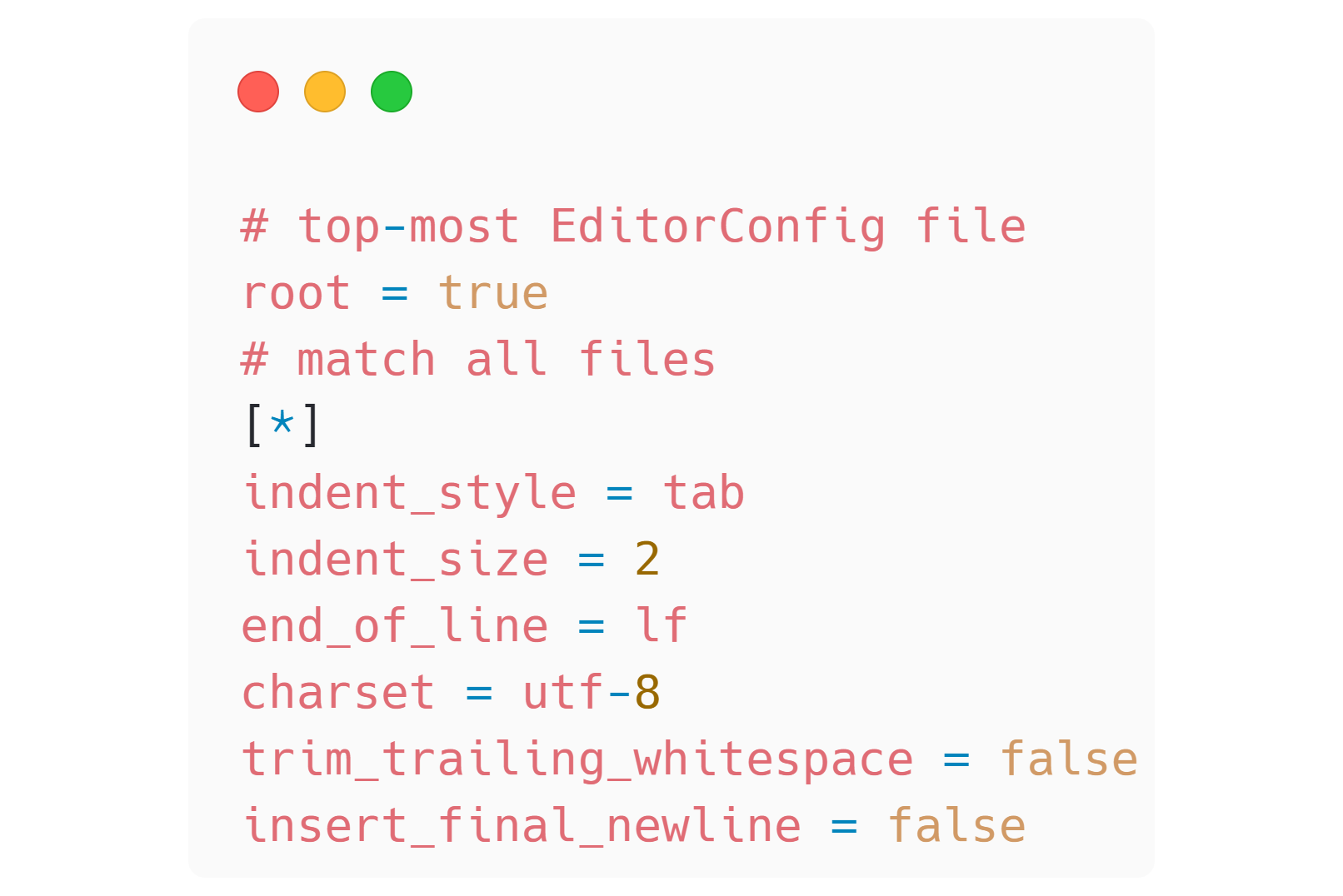
FIG 5.9: An .editorconfig file can automate away cross-platform and user-dependent whitespace concerns.
Lint#
The popular code linter ESLint241 ensures your code adheres to rules that you configure. Say you never want a console.log to show up in a production website. Set a lint rule to enforce it. Or maybe you are particular about the order of your dependency imports—there is a rule for that too. ESLint also has a REPL242 (remember those from earlier?) so users can play with rules without having to invest in a local installation. With a huge variety of built-in default rules, and the ability to define custom rules, it’s safe to say that nearly any spicy programming opinion can become a lint rule. Once defined, you get to decide if lint rules are warnings or errors—each can carry different urgency to resolve within your codebase. A common convention is to run lint checks within a CI build so code on the remote is sanitized before merging.
Lint rules are a perfect vehicle to automate project preferences. Make sure you strike the right balance here and don’t fall into pedantry. We want to guide contributors toward the right solutions without throwing up too many barriers along the way. Most editors have plugin support to give a developer real-time feedback as they type or save a file. The goal is that there are no surprises come review time—the value exchange is an explicit communication of expectations, a perhaps costly chore, but with a net-gain in consistency and quality.
Format#
A compatriot of the linter is the formatter. A properly automated formatter will ensure the code remains readable. Again, editor integration and CI validation blend to bring the best experience to contributors. The powerhouse formatting tool of the day is Prettier,243 but any will do. Prettier integrates with ESLint to format the code while conducting quality checks. (FIG 5.10)
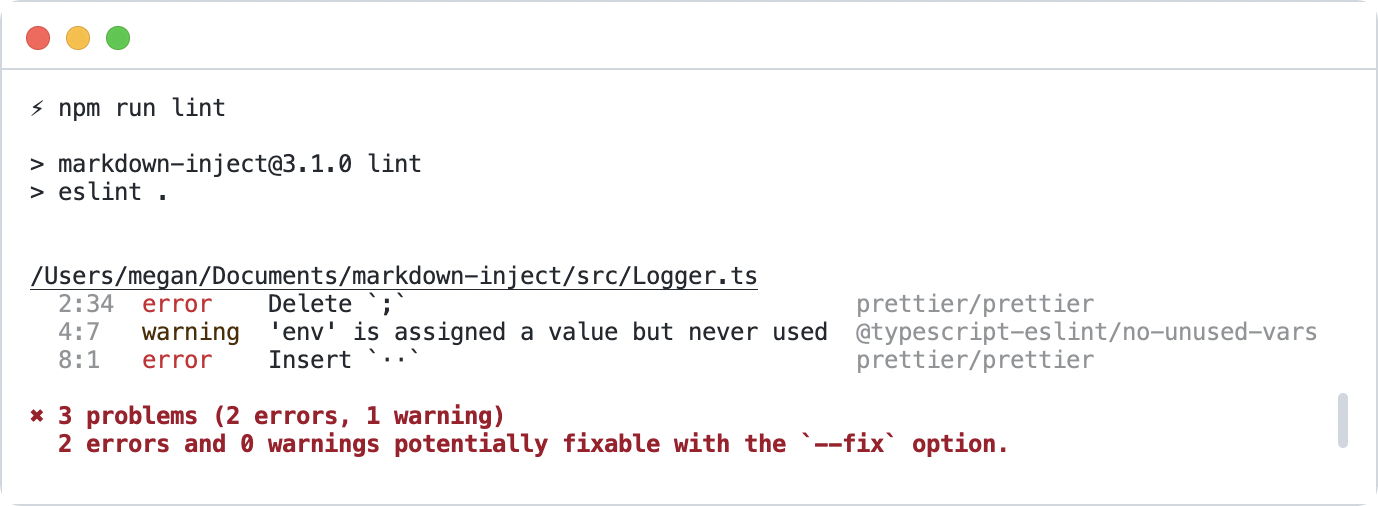
FIG 5.10: The eslint and prettier tools emitting code-quality guidance via rules setup in the project.
TypeScript#
I’m not certain this qualifies as an automation, but electing to write your project with TypeScript ushers in a new level of scrutiny your contributors and users will appreciate—type-safety. With TypeScript, your code becomes adherent to constraints enforced at build time, not runtime. If your function expects a string and you pass it an integer, it fails to build. If you specify a parameter as required and it’s omitted, the build fails. The shape of object properties can be defined and asserted. Power comes not only from your first-party code but also dependencies that ship with their own TypeScript definitions. Editor code-completions allow you to develop with spidey-senses tingling the whole time, telling you what is available and what to watch out for.
The TypeScript language is expansive and nuanced, with a learning curve that applies to maintainers and contributors alike. Luckily, it’s also the subject of many courses, cheatsheets, tutorials, and independent guides to help. AI assistants shine here too. I suggest you start small with any TypeScript journey. It’s too easy to get a bit lost otherwise. As Sean Wang puts it, “Use types. Not too much. Mostly basic.” Don’t be afraid or ashamed to relax the TypeScript settings within the tsconfig.json file of your project. Strict type-safety can be too intensive an investment, like pursuing too much code coverage. Adding the type unknown, any, or hinting to TypeScript not to bother with a @ts-ignore comment really isn’t that big a deal. These are safety valves to be used with intent. The acceptance or denial of this is another thing your project can automate via an ESLint rule.
Tests#
Tests are a dimension of your project that benefit from automation. This feels so obvious now I almost bother not to say so. But I have two opposing experiences to highlight.
What Testing Should and Shouldn’t Be#
At one of my first jobs, I remember writing test specification documents. The place was a strict waterfall development IT department attached to a manufacturer. The test document was heavily templated from some long-gone contracting firm, and mirrored the issue reproduction format. You know, the “environment setup, steps to reproduce, expected result, actual result” ideal report.
-
Except we wrote them ahead of time in a Word document.
-
And then we executed them manually.
-
And then we recorded the results.
-
And then we wrote our name in a table at the end of the document and the date.
-
And then we updated the Gantt chart.
-
And then no one ever looked at the test document again.
These manual acceptance tests were of course not automated. Their utility was limited to an instant when the project was evaluated as “done.” I hope nothing ever changed after that! At my next job I was blown away by the ability to use JsTestDriver244 to run automated unit tests against every browser I had installed on my machine (and on the build server). I remember installing more browsers with the explicit intent of achieving greater test coverage, especially in the era of Internet Explorer quirks (let me have my “in my day we walked uphill both ways” moment). It wasn’t ideal by today’s standards, but it’s stuck with me as a night and day difference in testing approach, tooling, and expectations.
Automating our tests helps maintainers and contributors know what contracts matter. We make clear our expectations, not of “done,” but “right.” Tests are an investment—a choice you make as a maintainer against all other priorities. Tests give us confidence that our code works under explicit circumstances. We align our tests with the API to assert value. Contributors can augment code with certainty that they have not broken existing functionality. The development of Pattern Lab Node was aided greatly by its comprehensive test suite of over six hundred tests.245 Contributors to the project were able to add functionality with a greater sense that a regression would not occur. A test is a promise that you don’t need to remember. These promises pinky-swear via a machine that never tires. No manual intervention required.
Ways to Automate Testing#
Assertions should run during key project events to guide activity toward stable outcomes. Here’s a short list of events where tests help, and how they can be automated:
-
Before merge of any new code: This is the traditional, obvious automation. Tools like GitHub Pull Requests can run tests via status checks.246
-
Before production release: Make sure your code works right before you publish. As part of a scripted workflow, or a tool like np that builds a test run in.247
-
After local development installation: npm lifecycle scripts like postinstall and prepare can help contributors run the tests to verify proper setup.248
-
Before commit: Run tests (or lint, or anything) before committing code to Git with tools like husky.249
-
During development: Most test runners like AVA250and Jest251 have a watch mode that will run tests on any code change. Node.js now has an integrated test command with watch mode too.252
Remember, seek to verify the code does what you think it will, within given constraints. I don’t recommend chasing a one hundred percent code coverage metric—it’s deceiving to think that the code is devoid of bugs with this measure. I’ve seen teams get caught up in pursuit of too much testing. Back away slowly if someone ever starts selling you on one hundred percent test coverage—they are one hundred percent wasting their time (and yours). Look for confidence in release. Find the right fidelity of tests based on the functionality of the software. For example, a website needs user-centric functional tests. A web server needs memory-optimizing perf benchmarks. A library may suffice with unit tests that check specific input and output.
Supply Chain Security#
Already covered in Chapter 3, automated dependency management tools are built into coding platforms or reasonably easy to integrate. But worth noting here is that as a maintainer of an open source project, you now enter into the complicated food web of dependencies not only as a consumer but as a consumed entity. It’s your responsibility to update your own dependencies and distribute them safely to downstream users. Look to ways you can configure the update tooling to work for you, not against you. Most let you set schedules, bundle changes, or ignore worrisome or brittle packages. Skimping on maintenance can put you and your users at risk. Projects that stagnate but become part of dependency chains make for hard-to-resolve, noisy experiences, such as when create-react-app had to pin a disclaimer on their issue log to head off confusion.253
The more dependencies you have, the more automated dependency updates may benefit or burden you. Why? It comes down to testing strategy. You of course don’t want to be in the business of writing tests for your dependencies. That’s their job! But, an automated dependency update needs to be verified nonetheless. Fortunately, your continuous integration system will run the assertions you’ve configured as part of the pull request. (FIG 5.11) Is that sufficient?
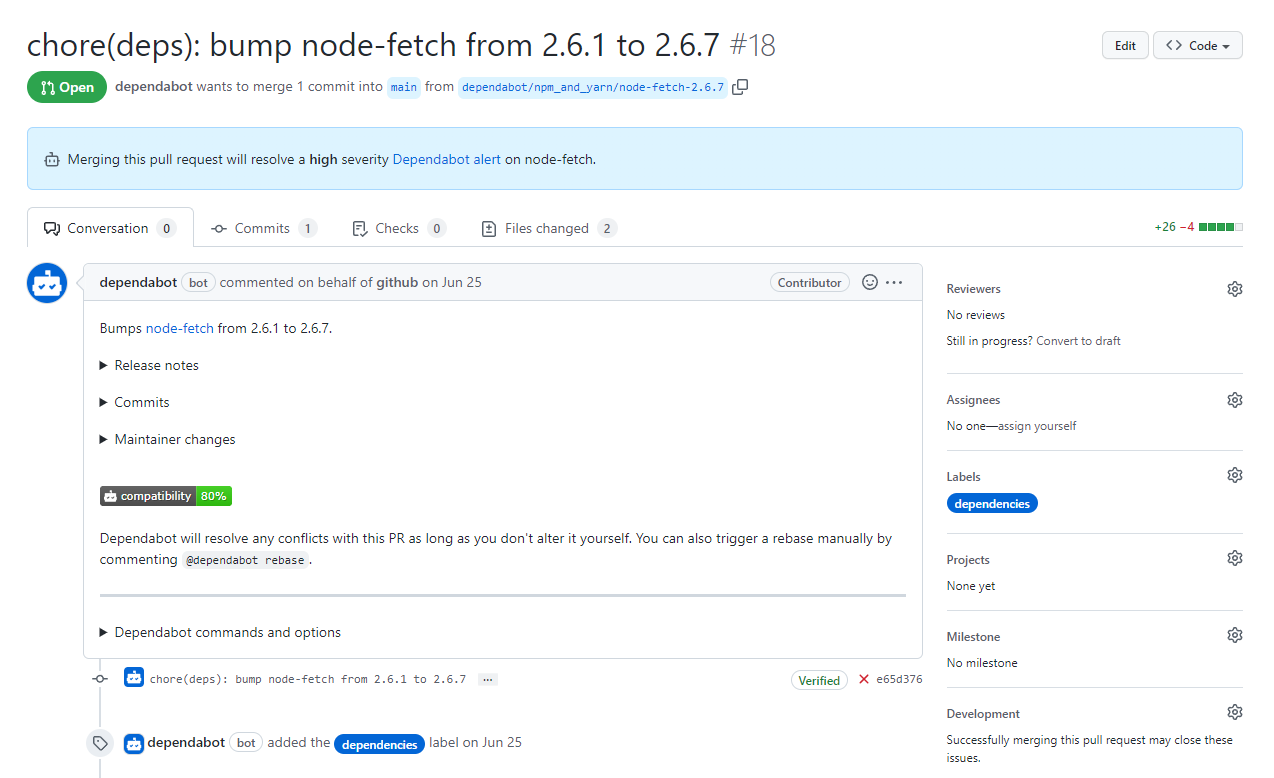
FIG 5.11: Do you have adequate functional tests to know that node-fetch will continue to work?
The breadth and depth of your tests will determine your confidence that the dependency update is safe. Inadequate test coverage, or more appropriately, inadequate testing strategy, will force you to accept the changes blindly or revert back to manual testing. For example, if a pull request only updates a dependency, but you explicitly mock that dependency in your test suites, how do you know it’s still working? Because of this conundrum, I advocate for functional test suites that exercise your project like a user would, rather than unit tests that only focus on individual parts. Both have their use cases, but only functional tests can build automated dependency update confidence.
Preview#
Services exist to show contributors and maintainers how a code change will affect a product. Cloudflare,254 Netlify,255 and Vercel256 all excel at this task and make it easy to integrate a preview into GitHub pull requests. (FIG 5.12) They best host to-be functionality that is visual, such as a website, deployed sandbox, demo, or component library. If your project applies, a preview deployment can directly solve the unit vs. functional test paradox I just outlined. Automating these ephemeral environments saves you time in pulling down a branch, running the code locally, and verifying the deployed output.
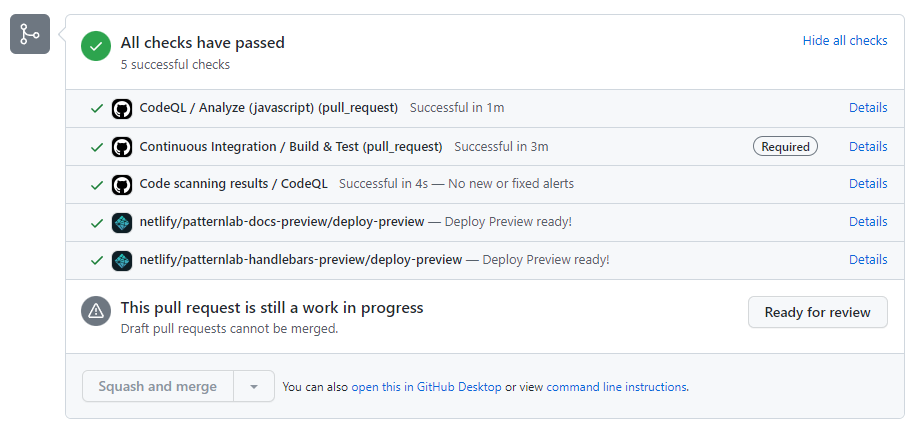
FIG 5.12: A GitHub pull request with two different deployment previews hosted on Netlify to preview project output.
Contributors also see the end-product in a real environment, which might help them contextualize their changes and iterate upon them. Most open source projects opting into this automated preview do not incur a cost, though it depends on your usage and feature set.
Deployment#
So far, the value of most of these automations has been creature comforts or tighter feedback loops for contributors. Automated deployment strategies serve a more urgent purpose: to release new code out into the world. It is a mark of high maturity to implement an automated release pipeline. It communicates to end users that you value contribution, and have confidence in your coding standards, review process, and team.
Release Early, Release Often#
Release on merge of every change if you can. There might be circumstances that deviate from this pattern, such as a monthly release cadence. Even so, a nightly or beta release might accompany each change. The goal of these releases is rapid distribution and feedback from your community, so this is no time to wait around. It’s a very deflating feeling as a new contributor to get your code change approved and merged, only to think “now what?” as maintainers sit on it. The auto command line tool257 (mentioned in the Resources section) is built to help release rapidly, incrementing the version of the package according to semver, adding a CHANGELOG entry, and publishing all in one package.
There are practical reasons to implement such easy optimization too. Believe me, you want a random pull request to fix a production issue when you are busy and your package is relied on by thousands of other packages. It’s never fun (and it could be dangerous) as a contributor to see a merged pull request go undeployed for no other reason than the maintainer needs to manually cut a release.
Generate Your Artifacts#
When automating publication, consider omitting artifacts from Git if there is a compilation step. Checking these changes into Git can lead to confusion during local development. For example, if you are writing your project in TypeScript, you’ll likely compile JavaScript build output. Become aware of the process npm uses when publishing a new package. The files key258 in your package.json will define what files get bundled into the tar file. Previewing what would be published is done by running the npm pack command in your terminal. This creates the whole tar file (installable in its own right), which you’d then need to unzip to inspect. Skip that step by running npm pack —dry-run, which will only output to the terminal but not write a file. The npm link command can help you test packages pre-deployment too.
What to Do When a Release Goes Wrong?#
Inevitably, something will go wrong. You’ll forget to commit a file. A pull request will overlook something (that should have been tested perhaps). You left an embarrassing console.log statement in while debugging. Ask yourself, “is the release stable?” The answer to that question may help you determine what to do:
-
Roll back: revert the most recent change(s) and return the code to a stable state. Depending on the severity, mark the release as unstable by updating any artifacts you can edit easily. Consider deprecation.259 Change the latest dist-tag260 back to a stable tag.
-
Roll forward: fix the instability or mistake with a new change. Careful when doing this—you are already under duress.
What you choose is up to you, but try to empathize with your users in this moment. Or recall times that you’ve consumed an unstable package. How busted is everyone’s CI pipeline right now? Is production down? What value exchanges are established, broken, or reinforced by each approach? Maybe it doesn’t matter, because you are still resolved to re-establish stability. Keep both tactics in mind as the proverbial shit hits the fan and you’ll be more cool-headed about what’s right for you and your community.
Maintain Course#
Set clear expectations within documentation and tooling. Improve what you need to, only when you need to. Invest in processes that optimize your time. Your footprint should grow with your project’s open source activity. An imbalance on either side is stressful—too much too soon feels like over-engineering. Too little too late feels like unmet community needs. Keep your initial value exchanges in mind and revisit them as needed. Allow the work to guide you with intention and eventuality, a boat using the cross-wind to help steer. If you keep at it, before too long, like-minded contributors will find you.